Make the knowledge on your site useful in conversation.
Dzen Chat turns your website, help centre and documents into a grounded assistant. People get a clear next step in their own words; your team has fewer repeated discovery questions to handle.
Type a message…➜
We are here to make answers easier to find.
When an answer is difficult to find, a routine question enters the paid support queue. The cost is measurable: contacts × handling time × your fully loaded hourly support cost. Every repeat contact also makes people with straightforward questions wait behind the hardest cases.
$38bneach year · about $3.2bn every month
US consumer waiting cost — A 2019 estimate of the value of time Americans spend waiting in customer-service queues.
Calculate the benefit for your team.
Change the three assumptions to see the direct cost of questions that an approved knowledge base could answer first.
Include the cost of support-team turnover.
Support teams replace people regularly: ContactBabel reports 31% average annual agent attrition in US contact centres (24% median, 2023). Each replacement has to relearn the same answers when knowledge is scattered. Estimate that paid handover and training time below.
Some of the cost cannot be priced honestly.
Your customers may search for answers in languages your team does not speak. Without multilingual, source-grounded support, those journeys often end before a question reaches the queue — so they do not appear in ticket or staffing reports, but they still cost trust and future revenue.
Combined potential benefit from fewer paid support contacts and lower turnover onboarding costs.
Total potential benefit / month$1,983
Total potential benefit / year$23,800
Dzen Chat gives people a source-grounded answer before they join the queue, so your team can focus on the exceptions that genuinely need them.
Sources: Which? (2024), Qualtrics XM Institute, Verint (2026), Harvard Business Review (2019), ContactBabel (2024). The calculator estimates workload only; it excludes churn and implementation costs.
Give people a useful route — and give your team a clearer signal.
Self-service that feels human
Visitors can explore approved knowledge as a dialogue, rather than navigate a maze of categories and filters.
Focus for support
Routine discovery questions receive a first line of help, leaving more room for cases that need judgment and a personal response.
Evidence for better content
Questions, source visits and answer feedback reveal where the site is clear — and where it is not yet doing its job.
Three steps from existing knowledge to a useful first conversation.
We begin with the sources and customer journey that matter most, then make the first result visible quickly.
Choose the knowledge
Connect the website, sitemap, documentation and selected files that should inform the assistant.
Shape the experience
Set the assistant’s voice, starting prompts and widget behaviour for the pages where people need help.
Put it in front of visitors
Add the embed, review the first conversations and improve the knowledge and journey from real demand.
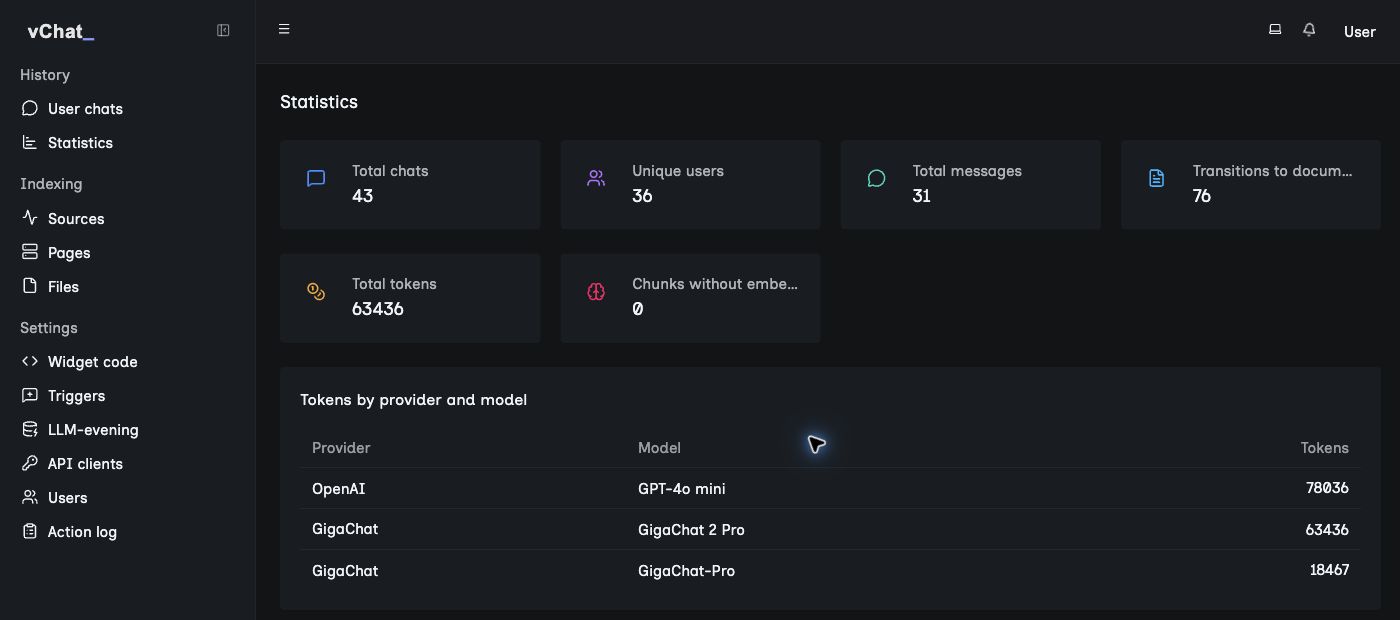
See what your audience is trying to understand.
The project interface turns conversations into a practical content signal: chats, unique users, messages, document visits and model usage.
Built around the parts that make a knowledge assistant reliable and useful.
Sources you choose
Start with website pages, sitemaps, documentation and supported files. Keep the assistant anchored in material your team approves.
Your brand, your context
Adapt visual style, language, welcome, suggestions and placement so the chat belongs to the journey it supports.
Conversations for your audience
Choose the model and retrieval configuration for the languages and infrastructure requirements that matter to your organisation.
A setup that fits
Run with Dzen in a managed environment or scope a private deployment in your own contour.
A support surface that gets more useful with every real question.
Improve the pages people already use
Find gaps in the source material from the questions your audience actually asks.
Keep ownership with your team
Decide which knowledge is included, how it is presented and where the assistant belongs.
Extend when the journey is ready
Start with the high-value route, then add sources, languages or deployment requirements deliberately.
The details that make a useful assistant part of the operating model.
Guidance with boundaries
Suggested next questions, links to sources and configurable widget behaviour keep an answer connected to the page a visitor came to understand.
- Context from the current page
- Answers with source links
- Configurable identity and welcome
A practical operating signal
Use activity, source visits, feedback and model usage to decide which knowledge needs attention next.
- Conversation and user activity
- Document visits and answer feedback
- Provider and token visibility
From first source to a working experience, we build it with you.
Dzen supports the work around the assistant: choosing a useful starting scope, connecting knowledge, configuring the experience and reviewing what real visitors need next.
- Clarify the first job
Choose the audience, page flow and knowledge that deserve attention first.
- Prepare the launch
Connect sources, set the assistant’s boundaries and place the widget in context.
- Learn and improve
Use the conversations and feedback to guide the next content or product decision.
See the first useful conversation on your own knowledge.
A generic demo is not proof that an assistant will answer your customers’ questions. We start by looking at your real source material and the journey it should improve.
Bring one high-value journey
A documentation page, pricing question, policy or support flow is enough to make the conversation concrete.
Review the sources together
We identify what can be used now and where an answer should lead back to the original material.
Decide from a working example
Assess the quality of the route forward before expanding the scope.
Let’s find the questions your site should answer better.
Tell us about your website, knowledge sources and support flow. We will propose a focused Dzen Chat starting point.