Putting a chat widget on a website is technically simple. Connect the sources, copy the code, check one question — and it looks like the launch is ready.
But a visitor won’t come with a demo question. They may ask about an exception to a rule, a limit in a plan, or a condition described across two different documents. If the assistant doesn’t show the current source, doesn’t recognize the boundary of its scope, or fails to offer a next step, the widget will only make the problem more visible.
A good first launch is not a promise to answer everything across the whole site. It’s one verifiable scenario: a known audience, a selected set of materials, questions from real work, and people who will support the result after publication.
First define the scenario, not the placement of the button
The phrase “we need a chatbot on the site” is too broad to base a decision on. Start with the visitor path where an answer can actually help:
- a potential customer wants to understand a product limit from the documentation;
- a current customer is looking for an onboarding instruction;
- a partner is trying to find the current rule in the portal or guide.
A useful starter formula looks like: “When this visitor asks about this topic, the assistant uses these approved sources and helps reach this next step.”
If the team cannot write such a sentence, choosing the button color or a publication date is premature. First agree which task counts as solved and which questions are outside the first boundary.
A narrow launch is not a compromise. It makes it possible to verify answer quality on a real task and then expand the knowledge base deliberately, not by inertia.
1. Check sources before checking answers
The assistant’s answer depends on the materials the team allowed it to use. Crawling the site broadly may seem a safe way to “not miss anything,” but it can mix an old FAQ section with a new policy, include pages for a different audience, or pick up an unfinished document.
Before launch, answer five questions:
- Who owns the set of sources and approves its changes?
- Which site sections, documents, and files are included in the first scenario?
- When was each source last reviewed and how does the team learn about changes?
- Which materials should be excluded: drafts, retired rules, confidential files, conflicting versions?
- Which topics require an explicit route to a specialist: plans, legal terms, account access, security, or custom obligations?
In Dzen Chat sources are not an invisible technical background. On the “Sources” screen you can view which pages are ready, awaiting processing, being processed, excluded, or finished with an error. The team also adds a source, starts a crawl, or pauses it there if needed.
This changes the meaning of regular checks. It is not enough to agree to “update documentation quarterly.” The owner must see that an important page actually made it into the ready contour, and that a crawl error, a blocked crawl, or a stuck queue did not leave an answer without grounding.
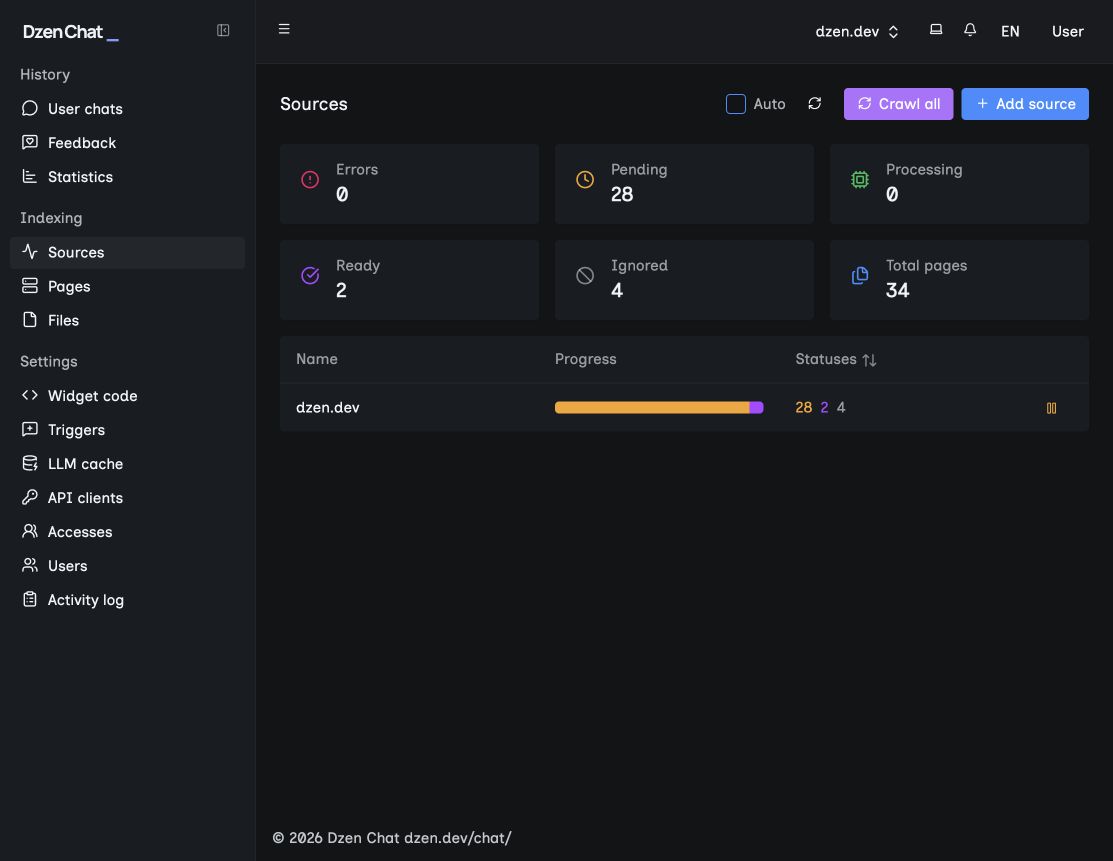
The “Sources” screen shows overall indexing status and progress for each connected source.
2. Collect questions that resemble visitor questions
One question about refunds or plans is fine for a quick check, but not for a go/no-go launch decision. Take a small sample from support tickets, sales calls, site search queries, documentation feedback, or staff who talk to customers.
Personal data should be removed from examples, but preserve phrasing and ambiguity where possible. A visitor rarely uses the words from a document title. They may write briefly, with typos, ask two questions at once, or omit a condition on which the answer depends.
The set should include:
- typical questions in the visitor’s words;
- questions that require linking a rule and a condition from different sources;
- ambiguous questions that first need a clarifying follow-up;
- questions outside the chosen contour;
- questions that help detect an old policy or a missed source update.
For each example, record the expected source and the next step. This is not an attempt to write a perfect answer in advance. It is a way to check that the team can explain why the assistant answered the way it did.
3. Evaluate the answer together with its source
Smooth wording alone does not prove quality. Open the answer and the link to the source simultaneously, then check:
- does the answer rely on approved material;
- does the link support the main claim, not just contain a similar word;
- does the answer distinguish the general rule from exceptions;
- is the text understandable to someone without internal terminology;
- is it clear what to do if the source does not authorize the request.
Dzen Chat can show the source of an answer. For the visitor this is an opportunity to verify a detail. For the team it is a way to find a weak spot: sometimes what needs improvement is not the model prompt but the instruction, policy, or structure of the knowledge itself.
If there is no reliable answer to a question, do not mask this with convincing wording. It is better to exclude the topic from the first launch, supplement the source, or provide a clear route to the responsible person.
4. Configure the widget as part of the site
The widget is visible not only to the person who needs an answer. Any visitor on the page can see it. Therefore, before launch it is important to check where it appears, what expectation it creates, and how naturally it sits alongside the site.
Each widget in Dzen Chat has separate “Settings” and “Appearance” tabs. In Settings you can check the title, greeting, required links and texts that steer the dialog. In Appearance presets, local fonts, button colors, and chat surface colors are available. The preview updates before saving, so design can be agreed on in the widget configuration rather than on a live page.
Before publishing, mark:
- The widget appears on the pages of the chosen scenario and does not show up where it distracts from an important action.
- The invitation explains what the assistant helps with, rather than promising an answer to every question.
- The title, greeting, colors and links match the site and are understandable to the visitor.
- The widget is tested on mobile: it can be opened, the source can be viewed, scrolled, closed, and the visitor can return to the page.
- Keyboard control, visible focus, contrast and reading order are checked for both closed and open windows.
- The same typical questions are tested for the agreed languages. The set of languages depends on the chosen AI provider and model, so confirm it for the specific launch.
The goal of appearance is not to make the chat more noticeable at any cost. The visitor should understand what kind of assistant it is, how it is useful, and how to return to normal site navigation.
5. Perform a privacy and security review for the real contour
The word “security” cannot be the only checklist item. The review must fit the sources, the visitor path, the placement method, and the AI provider requirements.
For the first launch agree on:
- whether the hosted Dzen Chat environment will be used or a deployment in your infrastructure;
- who and which systems have access to sources, configuration and operational data;
- whether connected materials go beyond the approved data boundary;
- what privacy information the visitor sees before interacting with the assistant;
- who is responsible for an incident involving data, security or access.
If the organization has its own infrastructure, provider requirements, or a separate data contour, Dzen Chat can be discussed for deployment into that environment. The important thing is not the name of the option but meeting the requirements of the specific scenario.
6. Assign an owner after launch
A chatbot doesn’t end on the day of publication. Pages and rules change, visitors ask unexpected questions, and some materials require re-verification. The support process must be ready before traffic appears.
Assign:
- an owner for updating sources and reindexing;
- a date for the first review and an ongoing review rhythm;
- analytics or dialog signals the team will monitor;
- an owner for unanswered questions;
- a person who can expand sources, change widget behavior, or open a high-risk topic.
Monitoring does not promise to automatically reduce support load. It helps see whether a visitor reaches a useful answer and where the original information still needs work.
7. Make the launch decision openly
Before publishing, bring together the source owner, the scenario owner and the person responsible for the site experience. Review questions, answers, sources and unresolved items together.
Consider the launch ready when:
- the scenario, sources and exclusions have an owner;
- typical, ambiguous and negative questions are checked together with sources;
- there are no unclear issues on the “Sources” screen that affect the chosen contour;
- the widget is tested on the required pages, on mobile devices and in all agreed languages;
- the privacy and security review matches the actual deployment;
- there is an update plan, a date for the next review and an owner for unanswered questions;
- the remaining limitations are recorded and visible to decision-makers.
If traffic and process allow, start with a controlled rollout: limit the set of pages, the audience, or the observation period. This lets the team see real questions without presenting the experiment as readiness for the whole site.
A small assistant with a clear boundary is more useful than a broad assistant that creates false confidence.
Start with one verifiable path
Dzen Chat helps connect selected site sources, documentation and files so a visitor can ask questions in a dialog and open the source of the answer. The team manages sources and the specific widget settings, then checks how this path works in real life.
Discuss launching Dzen Chat — start with one scenario, its sources, and a list of questions that truly matter to your visitors.